Monday, February 7, 2011

Careful, Your Priorities Are Showing


Sent to you by David via Google Reader:


via There, I Fixed It - Redneck Repairs by Cheezburger Network on 2/7/11

white trash repairs - Careful, Your Priorities Are Showing

There's a metaphor for stereotypical Californians somewhere in here. ~Not-So-Handy Andy


Submitted by: Unknown


Things you can do from here:


Friday, February 4, 2011

Hotmail Launches Accounts You Can Throw Away

finally a feature that hotmail has (or will have) that google should have...


Sent to you by David via Google Reader:


via Slashdot by timothy on 2/3/11

suraj.sun writes with this excerpt from CNET: "Today, Hotmail is getting a new feature aimed at 'e-mail enthusiasts,' which lets anyone create multiple e-mail accounts that can be read, replied to, and managed from their everyday e-mail inbox. These additional e-mail addresses can be had in the same manner as signing up for new accounts, but they require no extra log-ins or upkeep. ... The idea is to give users a safe way to provide third parties with an e-mail address, without giving up the address they've provided to family and friends, which, if compromised, can end the usefulness of that particular account. Each user will be able to create up to five aliases, any of which can be deleted and replaced with another at any time. Over time, Microsoft will increase that limit to 15 aliases per account, making it so that the true heavy users won't need to juggle between two or more Hotmail accounts."

Read more of this story at Slashdot.


Things you can do from here:


Thursday, February 3, 2011

Get The Stuff On This Checklist Before The Winter Storm Slams Your House


Sent to you by David via Google Reader:


via The Consumerist by Ben Popken on 2/1/11

Before the storm hits, get equipped. If you're one of 100,000,000 Americans who is about to get smashed with this frozen blast, here's a list of supplies you should have on hand before you get snowed in.

Publishing sibling Consumer Reports Home and Garden blog recommends you have:

  • 1 gallon of water/person/day
  • No-cooking required food
  • Zero-electricity can opener
  • First-aid kit
  • Battery-powered radio
  • Flashlights
  • Batteries
  • Fuel for stoves
  • Extension cords
  • Wrenches and pliers for turning off utilities and shutting water pipes
  • Fire extinguishers
  • Battery-powered smoke and CO alarms
  • Fuel for snow blower
  • Snow shovels
  • Rock salt, calcium chloride, and sand for melting snow
  • Hat, scarf, mittens
  • Can of Yeti-Off
  • Flares
  • Car jack
  • Lug wrench
  • Jumper cables

'Megastorm' storm to affect 100 million Americans [Consumer Reports Home & Garden Blog]


Things you can do from here:


Monday, January 31, 2011

Make Easy Homemade Doughnuts with Canned Biscuit Dough [Recipes]


Sent to you by David via Google Reader:


via Lifehacker by Kevin Purdy on 1/26/11

Make Easy Homemade Doughnuts with Canned Biscuit DoughYou might know them as "Campfire Doughnuts," and the purist inside you doesn't have to consider them official. But the part of you that wants the freshest possible doughnut-ish treat can quickly fry up a batch using cardboard-canned biscuit dough.

Make Easy Homemade Doughnuts with Canned Biscuit DoughThe most basic preparation is simply poking a hole in biscuit dough, such as Pilsbury's Grands, and frying them in a pan with just enough oil to make a difference. Done right, the results, as pictured, look hard to argue with. Serious Eats, which shares this nice bit of wisdom with the web, provides recipes for a few glazes you can make for your homemade doughnuts, ranging from classic to culinary.


Things you can do from here:


Friday, January 28, 2011

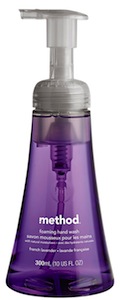
Method Foaming Soap Dispenser

looks familiar...


Sent to you by David via Google Reader:


via Cool Tools on 1/28/11

Method foaming soap dispensers are inexpensive, reliable, and refillable. The soaps are widely available from retailers like Target. Method's 300ml reservoir has a stable base and is larger than most foamers. The reservoir is transparent: if you have multiple dispensers, you can use the color of the soaps to tell them apart. I've used the Method foamers for over five years. I use them for hand soap, in the shower (soap and shampoo) and for hand-washing dishes. Foam soap cleans eyeglasses astonishingly well.

Foaming soap dispensers work by extruding the foam through the precisely-aligned pump mechanism. The foamers can be refilled; the trick is to dilute the soap the right amount. If the soap is too dilute, the foam will be wet and runny. If the soap is over-concentrated, the pump will be difficult to press. Foaming soap is white because the soap's surfactant has no color. If you see color in the foam some soap is getting pushed through the extruder without foaming. This damages the foaming mechanism รข€" use less soap! The foamers will eventually wear out but well-treated ones will work for at least a couple of years.

Lotions will not foam. The wonderful soaps from Burt's Bees will not foam (I'm not quite sure why). Other than that, virtually any liquid soap or shampoo will foam. Method's soaps use sodium lauryl sulfate (SLS) as their surfactant. I'm not fond of SLS; I prefer soaps made with saponified natural oils.

Foaming soap is a simple and effective green technology. The foam provides an optimal ratio of soap and water for cleaning. You can completely wash before turning on the tap for rinsing. It's good for sponge baths or camping when you have limited access to water. Foam uses the soap far more efficiently: you will be using a fraction of the soap from your pre-foam days. Less soap also means fewer chemicals for the wastewater treatment facility to remove.

-- Phil Earnhardt

Method Foaming Hand Wash-
10 oz bottle
$2.99

Available from Target

Method Foaming Hand Soap
6-pack of 10 oz bottles
$22

Available from Amazon

Manufactured by method


Things you can do from here:


Monday, January 24, 2011

K-9 Mail Is What Android's IMAP Email App Should Be [Downloads]


Sent to you by David via Google Reader:


via Lifehacker by Kevin Purdy on 1/24/11

K-9 Mail Is What Android's IMAP Email App Should BeAndroid only: If you don't use Gmail or Google Apps, the default email experience on Android is, honestly, pretty cruddy, unless Motorola or HTC fixed up your Email app. K-9 Mail cleans up, optimizes, and just plain fixes Android's default Mail app.

What K-9 Mail does is not all that exciting to describe, unless you've used, or tried to use, Android's Mail app and found it entirely not up to the task. With K-9 Mail, the methods for filing messages, creating email signatures, keeping your mail pushed across all folders, and emptying the trash, for goodness' sake, are all available and just better. You can save attachments to your SD card, too, and support for IMAP and Exchange servers is much improved.

K-9 Mail states on its homepage that its mission is to be incorporated into Android's default Mail app. Here's hoping that happens. In the meantime, it's a free download for Android systems only.

k9mail [Google Code via Ars Technica]


Things you can do from here:


Learn the Basics of Design This Weekend [Weekendhacker]


Sent to you by David via Google Reader:


via Lifehacker by Adam Dachis on 1/21/11

Learn the Basics of Design This WeekendLast weekend we looked at resources to teach you how to code, but writing your app is only half the battle. It needs to look good, too. Here are resources to help you learn the basics of design this weekend.

The Basics

Learn the Basics of Design This Weekend
To get started, you're going to need two things: a basic understanding of design and Adobe Photoshop. Of course, not everyone wants to drop hundreds of dollars on Photoshop (or the entire Adobe Creative Suite), so check out these alternatives (or these) if Photoshop is too expensive for your taste. As for the knowledge portion, here are the main things you want to learn:

Be sure you know how to use the software you've chosen as well. If it's Photoshop, there are excellent classes on lynda.com. If you'd rather go the free route, you can find plenty of stuff online. These tutorials provide plenty of good exercises to try so you can get acquainted with your toolset. You Suck at Photoshop is probably the most entertaining way to learn. We also post a few Photoshop tutorials here and there as well. If you want to learn specific, undoubtedly there is someone online who has posted some kind of help (likely in video form) which you can find with a quick web search.

Inspiration

Learn the Basics of Design This Weekend
Inspiration is what's going to help you find your style. Understanding how things work and what has worked in the past is important in most fields, but it's very important when it comes to design. That's not to say you should learn the rules and follow them with rigidly, but that it's extremely useful to know 1) what you like, 2) why you like it, and 3) how to create the designs you find most compelling. Once you've got those three things down, experimentation will come naturally.

So where do you find inspiration? One option is the design blog Web Design Ledger (WDL). They post tons of great examples of design elements to help you keep an eye on what's working and giving you a source of inspiration. Here are a few good posts to get you started:

Another great option is the design community Forrst. While the community is member-only, anyone can apply. It's a wonderful place to find other good design work and get feedback on your own to help you progress. A less-exclusive option is Ember, which is a similar type of site but was designed to work with some specific apps meant for clipping.

Once you start to find people you like, however, keep and eye on what they're doing and who they like so you can explore more points of inspiration. For example, Tina Roth Eisenberg (a.k.a. Swissmiss, designer of TeuxDeux) plays a very active role in promoting design she likes and sharing relevant designs resources on her blog.

Fonts

Learn the Basics of Design This Weekend
No designer is without his or her fonts, and there are numerous free options to choose from. Font Park will start you off with over 70,000 to choose from. Da Font is a smaller, more curated collection with tons of great options. There are plenty of other free font tools and resources, but it's more important to first understand typography. WDL offers up seven free typography ebooks to get you started. If you want additional portability, you can download the Typography Manual iPhone app. One you've got a basic understanding of typography, take a look at mastering font combinations. Rarely will you stick with a single typeface in a design, so understanding the principles of combining fonts can save you a lot of frustration.

What's the font in all the images? If you don't recognize it, head on over to the League of Movable type to download their wonderful font League Gothic.

Web Design

Learn the Basics of Design This Weekend
If you're looking to learn design, chances are you're planning on doing it for the web. Even if you're not going to learn how to code as well, you're still going to need to pass yourself off as a developer from time to time. Here are a few great resources to help cut development corners and get some really stunning functionality into your web designs without a ton of work:

Got any other great design resources you like? Share 'em in the comments!


You can contact Adam Dachis, the author of this post, at adachis@lifehacker.com. You can also follow him on Twitter and Facebook.


Things you can do from here: